
HP ENVY 6455e Ink Cartridge Guide
The HP ENVY 6455e uses HP 67 or HP 67XL black and tri-color ink cartridges. It is a two-cartridge all-in-one with automatic two-sided printing and a 35-sheet automatic document feeder, making HP 67XL especially relevant for families and home-office users who print regularly.
Recommended Ink for HP ENVY 6455e
For regular family, school, photo, and home-office printing, a black + tri-color HP 67XL set replaces both cartridge slots in one order. HP recommends 100–400 pages per month for the ENVY 6455e, so the higher-capacity XL option is a practical fit for recurring weekly use.
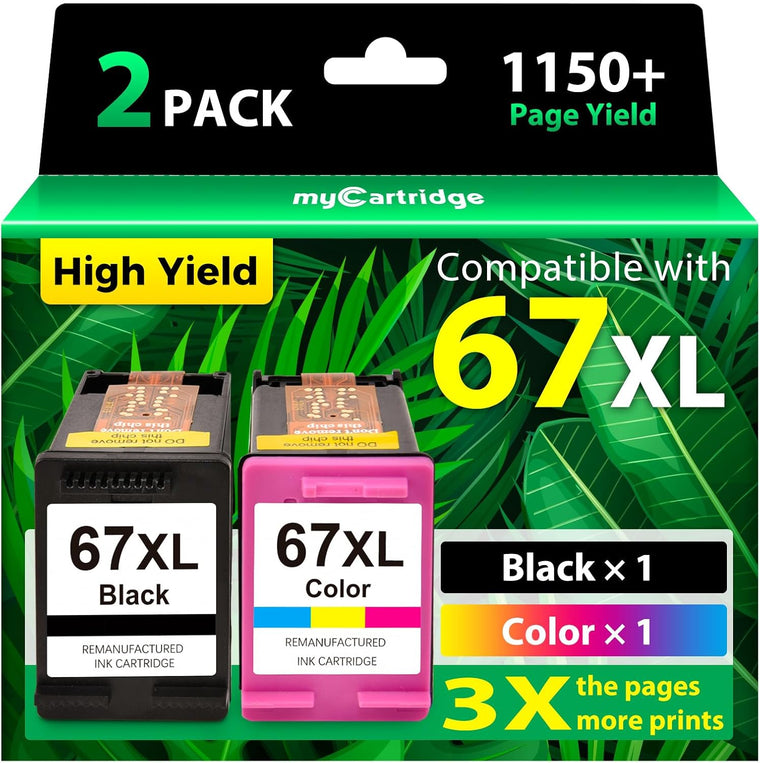
myCartridge HP 67XL Remanufactured Ink 2-Pack
Black + tri-color · Smart chips installed · No old-chip transfer required · For supported HP 67 / 67XL printer families.
- Black listed yield: up to 700 pages
- Tri-color listed yield: up to 450 pages
- Smart chips: installed before shipment
- Purchase protection: Lifetime Warranty + 365-Day Returns
What Ink Does the HP ENVY 6455e Use?
The ENVY 6455e uses the HP 67 cartridge family. You can use standard HP 67 or high-yield HP 67XL in the corresponding black and tri-color slots.
| Cartridge | OEM Reference | OEM Reference Yield | Best For |
|---|---|---|---|
| HP 67 Black | 3YM56AN | Approx. 120 pages | Very light printing |
| HP 67 Tri-color | 3YM55AN | Approx. 100 pages | Very light color printing |
| HP 67XL Black | 3YM57AN | Approx. 240 pages | Regular home / school printing |
| HP 67XL Tri-color | 3YM58AN | Approx. 200 pages | Regular color printing |
These are Original HP reference yields. Product-specific yields for compatible or remanufactured cartridges can differ.
Why HP 67XL Is a Strong Fit for the HP ENVY 6455e
HP positions the ENVY 6455e for regular home and family use. It supports automatic two-sided printing, a 35-sheet automatic document feeder, and a recommended monthly print volume of 100–400 pages, so users who print schoolwork, forms, photos, or multi-page documents can benefit from fewer cartridge changes.
| Use Case | What It Means for Ink | Recommended Starting Point |
|---|---|---|
| Occasional documents or a few photos | Capacity matters less than initial purchase price. | HP 67 |
| Weekly family / school printing | Regular black + color use increases replacement frequency. | HP 67XL |
| Multi-page scan/copy workflows | The 35-sheet ADF supports repeated document work. | HP 67XL 2-Pack |
| Printing near HP's 100–400 page recommended monthly range | Higher-capacity cartridges are the more practical starting point. | HP 67XL |
HP 67 vs 67XL for the ENVY 6455e
| Printing Pattern | Better Starting Point | Reason |
|---|---|---|
| A few pages every month | HP 67 | Lower initial purchase can matter more than capacity. |
| Weekly homework / household documents | HP 67XL | Higher capacity and fewer replacements. |
| Forms, labels, recipes and projects | HP 67XL | Better fit for regular black + color use. |
| Both cartridge slots are low | HP 67XL 2-Pack | Replace black and tri-color together. |
For the full capacity and cost-per-page comparison, see the HP 67 vs 67XL guide.
Check HP+ / Instant Ink Before Buying Remanufactured Ink
The HP ENVY 6455e is an HP+ enabled printer. HP states that choosing HP+ during setup requires an HP account, an ongoing internet connection, and exclusive use of Original HP ink for the life of the printer. HP+ is optional at setup; if it was not activated, the printer still uses Dynamic Security and cartridge recognition can be affected by firmware.
If yes, HP requires Original HP ink for the life of the printer. Do not order remanufactured ink for that HP+ configuration.
If HP+ was not activated, still confirm Instant Ink subscription, billing, and cancellation status before changing to independently purchased cartridges.
This printer uses Dynamic Security. Firmware updates can change how cartridges are recognized, including cartridges that previously worked.
Check the current cartridge label before ordering. Similar-looking HP printers can use a different cartridge family.
HP ENVY 6455e vs “ENVY Pro 6455e”: Which Name Should You Use?
HP's current U.S. support and store pages identify the e-model as HP ENVY 6455e. Some shoppers and older listings use “ENVY Pro 6455e” when referring to the 6400-family design. For cartridge ordering, use the exact model label on your printer and confirm that the installed cartridge says HP 67 or HP 67XL.
How to Install HP 67XL in the HP ENVY 6455e
The image below shows the HP 67XL cartridge preparation steps. The video demonstrates the same HP 67 / 67XL two-cartridge installation workflow on another supported DeskJet / ENVY model.

- Turn on the printer and open the cartridge access door.
- Wait until the carriage stops moving.
- Remove the old cartridge from the matching slot.
- Remove all protective tape, caps, and seals from the replacement cartridge.
- Do not touch the copper contacts or ink nozzles.
- Insert black into the black slot and tri-color into the color slot.
- Press the cartridge firmly into place and close the access door.
- Follow the printer prompts and print a test page.
HP ENVY 6455e Cartridge Problems: Quick Diagnosis
| Message / Symptom | Check First | Next Step |
|---|---|---|
| Cartridge not recognized | Correct HP 67 / 67XL family, protective tape, contact seating | Reseat once and restart the printer. |
| Used / Non-Original cartridge | Whether an OK / Continue / Proceed option is available | Follow the supported prompt when printing is allowed. |
| HP+ / Instant Ink warning | Account and enrollment status | Resolve the account restriction before replacing more cartridges. |
| Blank / missing color | Nozzles, seating, protective material | Run one cleaning cycle and print a test page. |
| Issue after firmware update | Firmware version and recognition status | Contact support before repeatedly replacing cartridges. |
For a deeper troubleshooting flow, see HP 67XL cartridge not recognized.
Do Not Buy These Ink Families for the HP ENVY 6455e
| Ink Family | ENVY 6455e | Reason |
|---|---|---|
| HP 60 | No | Different cartridge family. |
| HP 65 / 65XL | No | Different cartridge family. |
| HP 63 / 63XL | No | Different cartridge family. |
| HP 64 / 64XL | No | Different supported printer family. |
| HP 910 / 910XL | No | OfficeJet cartridge family. |
| HP 67 / 67XL | Yes | Correct cartridge family for this printer. |
myCartridge.com Official Website Purchase Protection
Orders placed directly through mycartridge.com qualify for:
- Lifetime Warranty
- 365-Day Returns
- Full after-sales customer support
- Product quality assurance
- Pre-shipment firmware compatibility checks
myCartridge products purchased elsewhere, whether new or used, do not receive these official website guarantees or services. Because we cannot verify the source, authenticity, storage, handling, prior use, chip version, firmware compatibility status, or current condition of outside-channel products, we cannot guarantee their printer compatibility, cartridge recognition, normal operation, print quality, performance, or reliability.
HP ENVY 6455e Ink Frequently Asked Questions
What ink does the HP ENVY 6455e use?
The HP ENVY 6455e uses HP 67 or HP 67XL black and tri-color ink cartridges. It has two cartridge slots: one black and one tri-color.
Does HP 67XL work with the HP ENVY 6455e?
Yes. HP lists HP 67XL Black 3YM57AN and HP 67XL Tri-color 3YM58AN as high-yield replacement cartridges for the ENVY 6455e.
Can I use remanufactured ink if HP+ was activated on my HP ENVY 6455e?
No. HP states that an ENVY 6455e configured with HP+ requires exclusive use of Original HP ink cartridges for the life of the printer.
Is HP+ mandatory on the HP ENVY 6455e?
HP describes HP+ as optional during setup. If HP+ was not activated, the printer is not subject to the HP+ original-ink-only lifetime requirement, but Dynamic Security and firmware can still affect cartridge recognition.
How many cartridges does the HP ENVY 6455e use?
Two: one black cartridge and one tri-color cartridge.
Should I buy HP 67 or HP 67XL for the ENVY 6455e?
Choose HP 67 for very light printing. HP 67XL is the better starting point for regular family, school, photo, or home-office printing because it offers higher capacity and fewer cartridge changes.
Does the HP ENVY 6455e have an automatic document feeder?
Yes. HP lists a 35-sheet automatic document feeder for the ENVY 6455e.
Why does my HP ENVY 6455e say Cartridge Problem?
Check the cartridge family, protective tape, copper-contact seating, HP+ or Instant Ink status, and whether recognition changed after a firmware update.
Can I use HP 65XL or 64XL in the HP ENVY 6455e?
No. Those are different HP ink families. The ENVY 6455e uses HP 67 or HP 67XL.
How do I install HP 67XL in the HP ENVY 6455e?
Open the cartridge access area, wait for the carriage to stop, remove the old cartridge, remove protective material, insert black or tri-color into the matching slot, close the door, and follow the printer prompts.
myCartridge is an independent supplier of compatible and remanufactured printer cartridges. HP, ENVY, ENVY Pro, HP 67, HP 67XL, 3YM55AN, 3YM56AN, 3YM57AN, 3YM58AN, HP+, Instant Ink, and related names are trademarks or model references of HP Inc. and are used only to describe printer and cartridge compatibility. myCartridge products are not manufactured, sponsored, or endorsed by HP Inc.