Brother Toner Comparison Guide
Brother TN229 vs TN229XL: Which Toner Should You Buy?
Not sure whether to buy Brother TN229 or Brother TN229XL toner? The simple answer is this: TN229 is the standard-yield option, while TN229XL is the high-yield option. Both are used by compatible Brother color laser printers in the TN229 family, but TN229XL prints more pages and is usually the better value for regular home office, school, and small business printing.
Quick Answer: Brother TN229 is standard yield. Brother TN229XL is high yield. If you only print occasionally, TN229 can work. If you print weekly or daily, TN229XL is usually the smarter choice because it offers more pages per cartridge, fewer replacements, and better long-term value.
TN229 vs TN229XL at a Glance
Both toner series are designed for compatible Brother color laser printers, but they are not equal in page yield. The XL version is built for customers who print more often.
| Feature |
Brother TN229 |
Brother TN229XL |
| Yield Type |
Standard Yield |
High Yield Recommended |
| Black Page Yield |
Up to 1,500 pages |
Up to 3,000 pages |
| Color Page Yield |
Up to 1,200 pages each for cyan, magenta, and yellow |
Up to 2,300 pages each for cyan, magenta, and yellow |
| Best For |
Light or occasional printing |
Regular home office, school, and small business printing |
| Replacement Frequency |
More frequent |
Less frequent |
| Long-Term Value |
Good for light users |
Usually better for frequent users |
Page yield is an approximate standard measurement. Actual yield can vary based on page coverage, print settings, graphics, charts, and color-heavy documents.
Recommended Choice: Brother TN229XL High-Yield Toner
If your printer uses the Brother TN229 toner family and you print more than a few pages occasionally, TN229XL is usually the better choice. It gives you higher page yield and helps reduce how often you need to replace toner.
Best High-Yield Pick
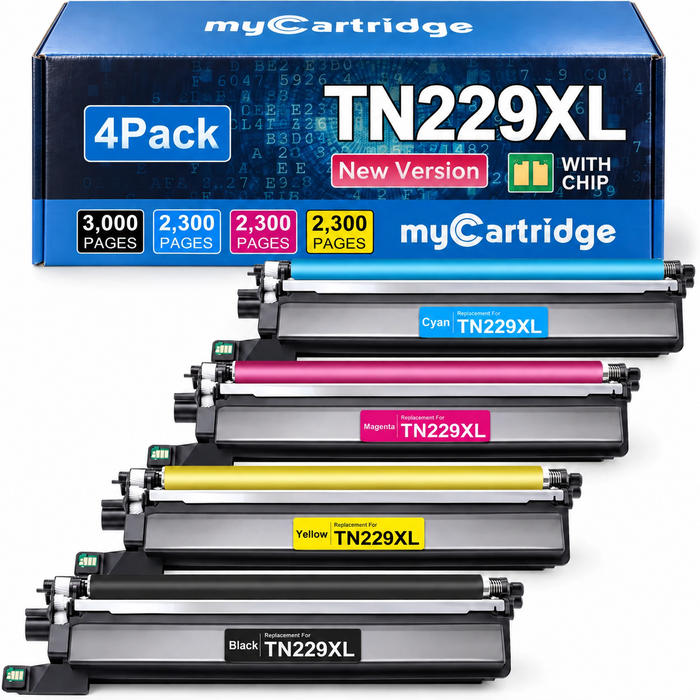
Brother TN229XL 4-Pack with Chips
A compatible high-yield Brother TN229XL toner 4-pack with black, cyan, magenta, and yellow cartridges. Designed for compatible Brother HL-L3000 and MFC-L3000 color laser printers that use the TN229 / TN229XL toner family.
$72
$95.99 before 25% OFF
25% OFF auto-applies in cart
In Stock
Estimated cost per listed page: about 0.73¢/page, based on the current $72 after-cart price and the combined listed yield of 9,900 pages.
Current 25% OFF: $72
Free U.S. Shipping $35+
30-Day Easy Returns
Lifetime Warranty
Which One Should You Choose?
Choose Brother TN229 If
- You print only occasionally.
- You want the lower upfront toner cost.
- You mostly print short documents.
- You do not mind replacing toner more often.
- You are buying only one color for light use.
Choose Brother TN229XL If
- You print every week or every day.
- You print invoices, schoolwork, charts, forms, reports, or presentations.
- You want fewer cartridge changes.
- You want better long-term value.
- You prefer a full 4-color toner set with chips installed.
myCartridge recommendation: For most regular users, Brother TN229XL is the better buy because it gives you more printable pages and a smoother replacement cycle.
Brother TN229 and TN229XL Cartridge Numbers
The Brother TN229 family includes separate black, cyan, magenta, and yellow cartridges. Match the color and yield level before ordering.
| Color |
Brother TN229 Standard Yield |
Brother TN229XL High Yield |
| Black | TN229BK | TN229XLBK |
| Cyan | TN229C | TN229XLC |
| Magenta | TN229M | TN229XLM |
| Yellow | TN229Y | TN229XLY |
Brother TN229 vs TN229XL
TN229XLBK
TN229XLC
TN229XLM
TN229XLY
Brother toner with chip
Is Brother TN229XL Worth It?
For frequent printing, yes. TN229XL usually makes more sense because its higher yield spreads the cartridge cost across more printed pages. That means fewer replacements and better long-term value for users who print regularly.
More Pages
TN229XL black prints up to 3,000 pages, compared with up to 1,500 pages for standard-yield TN229 black.
Fewer Replacements
High-yield cartridges help reduce how often your printer stops for toner replacement.
Better for Regular Use
For home offices and small businesses, XL toner is usually easier to manage over time.
Current after-cart price
$72
Based on the current 25% OFF discount auto-applied in cart.
Total listed yield
9,900
3,000 black pages + 2,300 pages each for cyan, magenta, and yellow.
Estimated cost/page
0.73¢
$72 ÷ 9,900 listed pages = about $0.0073 per listed page.
Best fit
Regular Use
Better for weekly printing, reports, invoices, schoolwork, and color documents.
Cost per page is an estimate based on listed page yield and the current 25% OFF price. Actual cost per page depends on page coverage, print settings, graphics, charts, and color-heavy documents.
Compatible Printer Models for Brother TN229 / TN229XL
Brother TN229 and TN229XL cartridges are used with select Brother color laser printers. Always confirm your exact printer model and cartridge number before ordering.
Brother HL Series
HL-L3220CDW
HL-L3280CDW
HL-L3295CDW
HL-L3300CDW
HL-L8245CDW
Brother MFC Series
MFC-L3720CDW
MFC-L3765CDW
MFC-L3780CDW
MFC-L8395CDW
Do Brother TN229XL Compatible Toners Need Chips?
For easier installation, choose compatible Brother TN229XL toner cartridges with chips installed. The myCartridge Brother TN229XL 4-pack includes chips for printer communication and toner status support, so you do not need to transfer chips from old cartridges.
Chips Installed
Designed to support cartridge communication with compatible Brother color laser printers.
No Chip Transfer
No need to remove chips from used Brother cartridges before installation.
Ready to Install
Install each toner cartridge into the matching black, cyan, magenta, or yellow slot.
Some Brother printers may display a non-Brother, non-original, or supply notification when compatible toner is installed. This can be normal with non-OEM cartridges. Follow the printer prompt to continue when available.
TN229XL Toner vs DR229CL Drum Unit
Brother TN229XL toner and the Brother DR229CL drum unit are different supplies. If your printer says toner is low, you need toner cartridges. If your printer shows a drum message, check the drum unit instead.
| Supply | What It Does | When to Replace |
|---|
| Brother TN229 / TN229XL | Contains toner powder in black, cyan, magenta, or yellow. | When the printer says toner low, replace toner, or a specific color is empty. |
| Brother DR229CL | Drum unit / imaging unit that helps transfer toner to the page. | When the printer shows a drum-related message or print quality remains poor after replacing toner. |
Simple rule: toner message = buy TN229 or TN229XL. Drum message = check DR229CL.
Not Compatible With These Brother Toner Families
Brother cartridge numbers can look similar, but they are not interchangeable. Do not buy TN229XL if your printer uses one of the following toner families.
| If Your Printer Uses | Common Printer Family | Why TN229XL Is Not Correct |
|---|
| Brother TN760 / TN730 | Many Brother monochrome laser printers | TN229XL is a different color toner family. |
| Brother TN830XL / TN830 | Newer Brother monochrome laser printers | TN229XL is not designed for this black-only printer family. |
| Brother TN436 / TN433 | Older Brother color laser printer families | TN229XL is not the correct cartridge series. |
| Brother LC ink cartridges | Brother inkjet printers | TN229XL is toner, not ink. |
Important: The safest way to buy toner is to match both your printer model and cartridge number. If your printer or manual says TN229 or TN229XL, you are in the correct toner family.
Why Buy Brother TN229XL Toner from myCartridge?
The myCartridge Brother TN229XL toner 4-pack is designed for users who want high-yield printing, clear compatibility, practical cost per page, and a simple replacement workflow without old-chip transfer.
Current 25% OFF price
$72
Auto-applied in cart for one TN229XL 4-pack.
Combined listed yield
9,900
BK 3,000 pages + C/M/Y 2,300 pages each.
Estimated cost/page
0.73¢
Calculated from $72 ÷ 9,900 listed pages.
Setup convenience
Chips In
No old-chip transfer required before installation.
What You Get
- High-yield 4-pack: Black, cyan, magenta, and yellow TN229XL-compatible toner cartridges.
- Chips installed: No old-chip transfer required before installation.
- Clear printer match: Designed for compatible Brother HL-L3000 and MFC-L3000 color laser printers that use TN229 / TN229XL.
- U.S. shipping: Free U.S. shipping on qualifying orders over $35.
- Support after purchase: Eligible orders are supported by 30-day easy returns and lifetime warranty coverage.
How Does myCartridge Compatible Toner Print?
In internal myCartridge R&D lab testing, a myCartridge compatible toner set achieved approximately 99.82% print output similarity compared with OEM output.
For everyday office documents, reports, invoices, presentations, shipping labels, schoolwork, and home business printing, the difference is typically difficult to notice. Under controlled test conditions, professional lab equipment is usually required to detect measurable differences.
Lab note: this print-similarity figure comes from internal myCartridge compatible toner R&D testing and is used here as a myCartridge quality-control reference. Actual output may vary by printer condition, paper, coverage, print settings, and document type.
Why Many Brother Users Compare TN229 and TN229XL
Brother TN229, TN229XL, and related cartridge names can be confusing because they look similar, fit overlapping printer families, and differ mainly by yield, cost per page, and model support. In public printer discussions, users often ask whether compatible toner is available, why replacement toner costs so much, and whether standard-yield or high-yield cartridges make more sense.
That is why this page focuses on the practical buying question: TN229 is fine for light use, but TN229XL is usually the stronger value for regular printing because it prints more pages before replacement.
External community discussions are provided as context only. Always confirm your printer model and cartridge number before ordering.
Ready to Choose the Higher-Yield Option?
For regular printing, the myCartridge compatible Brother TN229XL toner 4-pack gives you black, cyan, magenta, and yellow high-yield cartridges with chips installed.
Frequently Asked Questions
What is the difference between Brother TN229 and TN229XL?
Brother TN229 is the standard-yield toner option, while Brother TN229XL is the high-yield toner option. TN229XL prints more pages before replacement and is usually better for regular printing.
Can I use TN229XL instead of TN229?
Yes, if your Brother printer is compatible with the TN229 toner family and supports TN229XL, you can use TN229XL instead of standard-yield TN229. Always confirm your exact printer model and cartridge number before ordering.
Is Brother TN229XL worth it?
For frequent printing, TN229XL is usually worth it because it offers higher page yield, fewer replacements, and better long-term value than standard-yield TN229.
What is the estimated myCartridge TN229XL cost per page?
At the current 25% OFF after-cart price of $72, the myCartridge Brother TN229XL 4-pack is about 0.73¢ per listed page, based on a combined listed yield of 9,900 pages. Actual cost per page depends on page coverage, print settings, and document type.
How close is myCartridge compatible toner print output to OEM output?
In internal myCartridge R&D lab testing, a myCartridge compatible toner set achieved approximately 99.82% print output similarity compared with OEM output. For everyday documents, reports, invoices, presentations, shipping labels, schoolwork, and home business printing, differences are typically difficult to notice without controlled lab equipment.
How many pages does Brother TN229XL print?
Brother TN229XL black toner prints up to 3,000 pages. Brother TN229XL cyan, magenta, and yellow cartridges each print up to 2,300 pages under standard coverage conditions.
How many pages does Brother TN229 print?
Brother TN229 black toner prints up to 1,500 pages. Brother TN229 cyan, magenta, and yellow cartridges each print up to 1,200 pages under standard coverage conditions.
Does TN229XL fit Brother MFC-L3720CDW?
Yes. Brother MFC-L3720CDW is one of the compatible printer models for Brother TN229XL toner cartridges.
Which printers use Brother TN229XL toner?
Brother TN229XL is used with select Brother color laser printers, including models such as MFC-L3720CDW, MFC-L3780CDW, MFC-L8395CDW, HL-L3220CDW, HL-L3280CDW, HL-L3295CDW, HL-L3300CDW, and HL-L8245CDW. Always confirm your exact model before ordering.
Does the myCartridge Brother TN229XL 4-pack come with chips?
Yes. The myCartridge compatible Brother TN229XL toner 4-pack includes chips for printer communication and toner status support. No chip transfer from old cartridges is required.
Do I need to replace all four colors at once?
Not always. You can replace only the color that is low or empty. However, a 4-pack is convenient if you want black, cyan, magenta, and yellow ready for future replacements.
Is Brother TN229XL toner or ink?
Brother TN229XL is toner for Brother color laser printers. It is not ink and is not designed for Brother inkjet printers.
Does TN229XL include a drum unit?
No. TN229XL is toner only. It does not include the DR229CL drum unit, waste toner box, or other maintenance parts.
Will TN229XL fit Brother TN760 or TN830XL printers?
No. TN229XL, TN760, and TN830XL are different Brother toner series for different printer families. TN229XL is not interchangeable with TN760 or TN830XL.
myCartridge is an independent supplier of compatible toner cartridges. Brother, Brother TN229, Brother TN229XL, TN229BK, TN229C, TN229M, TN229Y, TN229XLBK, TN229XLC, TN229XLM, TN229XLY, DR229CL, HL-L3220CDW, HL-L3280CDW, HL-L3295CDW, HL-L3300CDW, HL-L8245CDW, MFC-L3720CDW, MFC-L3765CDW, MFC-L3780CDW, MFC-L8395CDW, and related printer or cartridge model names are trademarks or model references of Brother Industries, Ltd. and are used here only to describe printer and cartridge compatibility. This page and related products are not manufactured, sponsored, or endorsed by Brother Industries, Ltd.

